Supplier Enablement: From Manual Workflows to an Automated ServiceNow Experience
Exploring how automation and a centralized ServiceNow experience could help the Supplier Enablement team reduce manual work, improve campaign management, and spend more time engaging with suppliers.
Expertise and contributions:
User Research
Experience Design
Design Thinking
ServiceNow Design
Client
U.S. Bank
Role
User Experience Designer
The challenge
The Supplier Enablement team relied on a manual, fragmented process to manage campaign call lists and supplier assignments across spreadsheets and other tools. We needed to create a more centralized experience that could automate repetitive tasks, keep information organized and up to date, and help the team spend more time engaging with suppliers.
The impact
The team spent approximately 35 hours per week managing the Access Online upload process and related data.
The team estimated that automation could reclaim 12–14 hours per week for supplier calls, increasing potential call capacity from approximately 150 to 350 calls per week.
The existing process had been largely manual in Excel for approximately 10 years, creating inefficiencies, gaps, and opportunities for information to be missed.
The current experience was fragmented
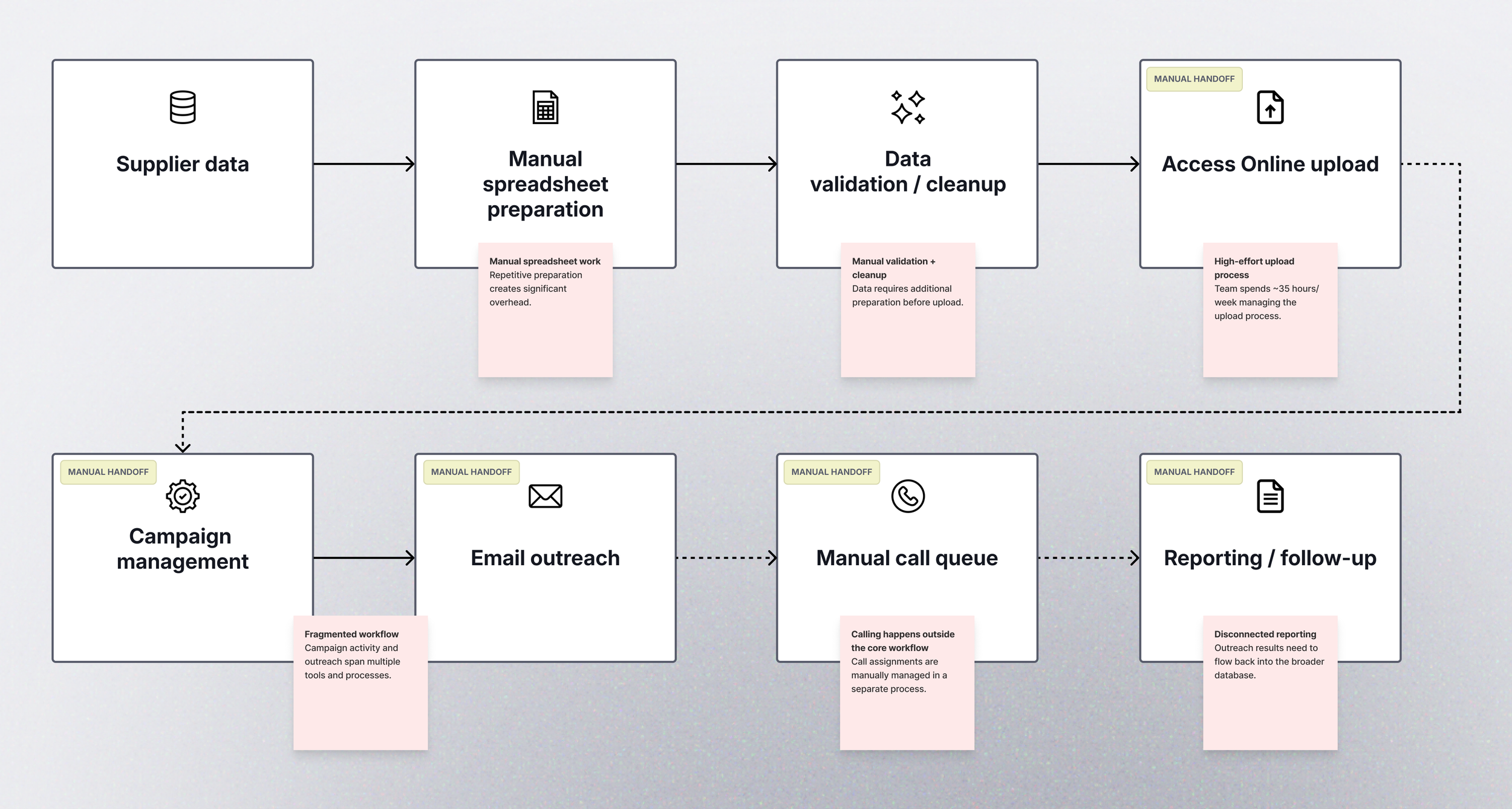
A simplified view of the current workflow revealed repeated manual preparation, disconnected tools, and handoffs across the campaign lifecycle.
The Supplier Enablement team wasn't simply asking for a new dashboard. They needed a more connected way to manage supplier outreach, campaign data, and calling workflows so they could spend less time managing information and more time engaging clients.
Discovery & alignment
Aligning on the opportunity
Before designing solutions, we needed to understand how Supplier Enablement worked today and align on what success should look like. Through collaborative design-thinking sessions, we brought design, product, engineering, and Supplier Enablement partners together to identify long-term goals, surface risks, and establish a shared direction.
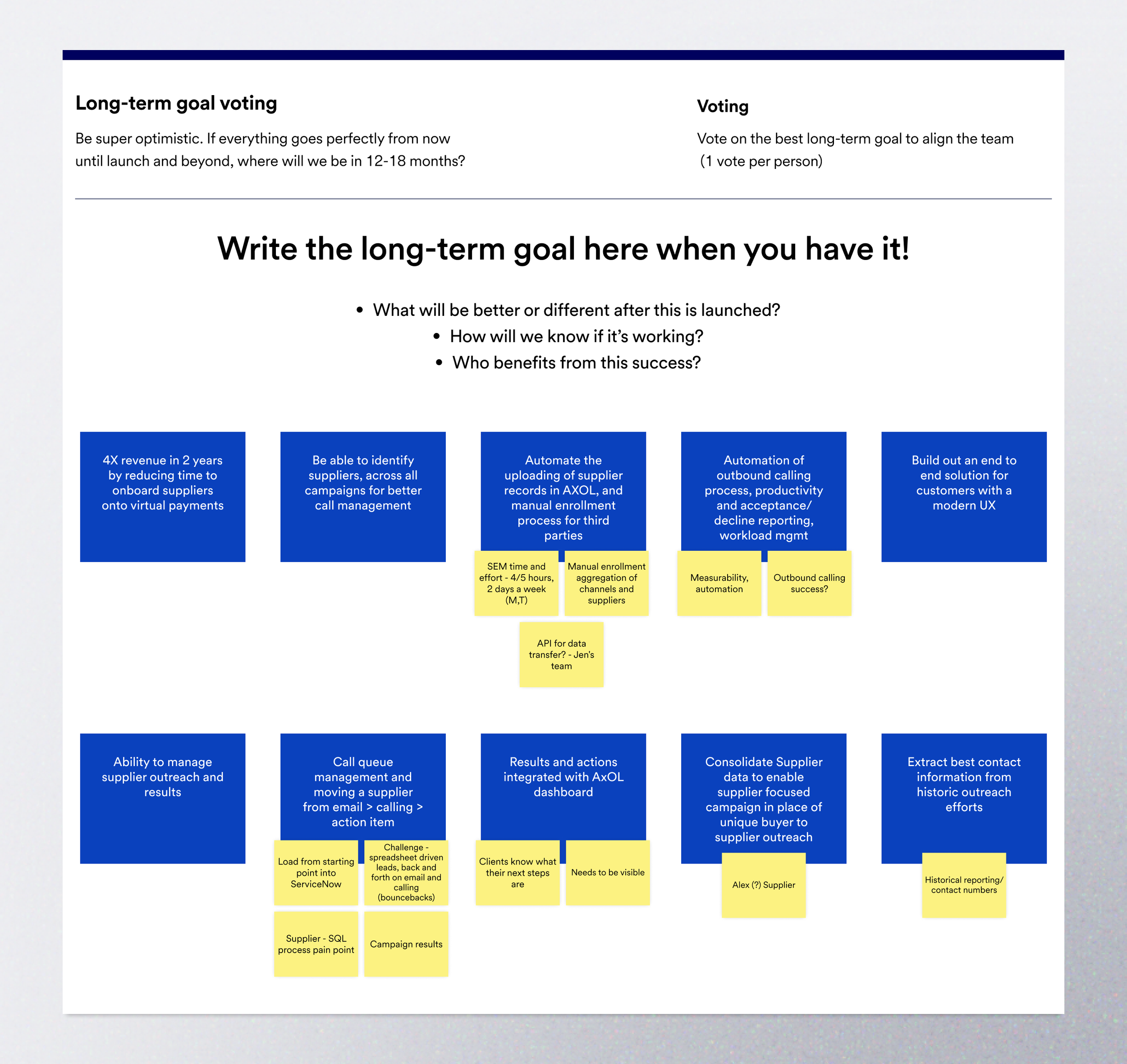
Collaborative voting exercise used by the team to identify and prioritize long-term goals for the Supplier Enablement experience.
What success looked like
The team aligned around a more integrated and automated workflow that could centralize supplier information, improve call management, reduce repetitive work, and give teams greater visibility into campaign progress.
Reduce manual work
Centralize supplier data
Learning from the people closest to the work
We interviewed partners across Supplier Enablement to understand how campaigns were managed day to day, where work was breaking down, and which parts of the process created the greatest burden. We synthesized those conversations through empathy mapping to uncover recurring behaviors, frustrations, and needs.
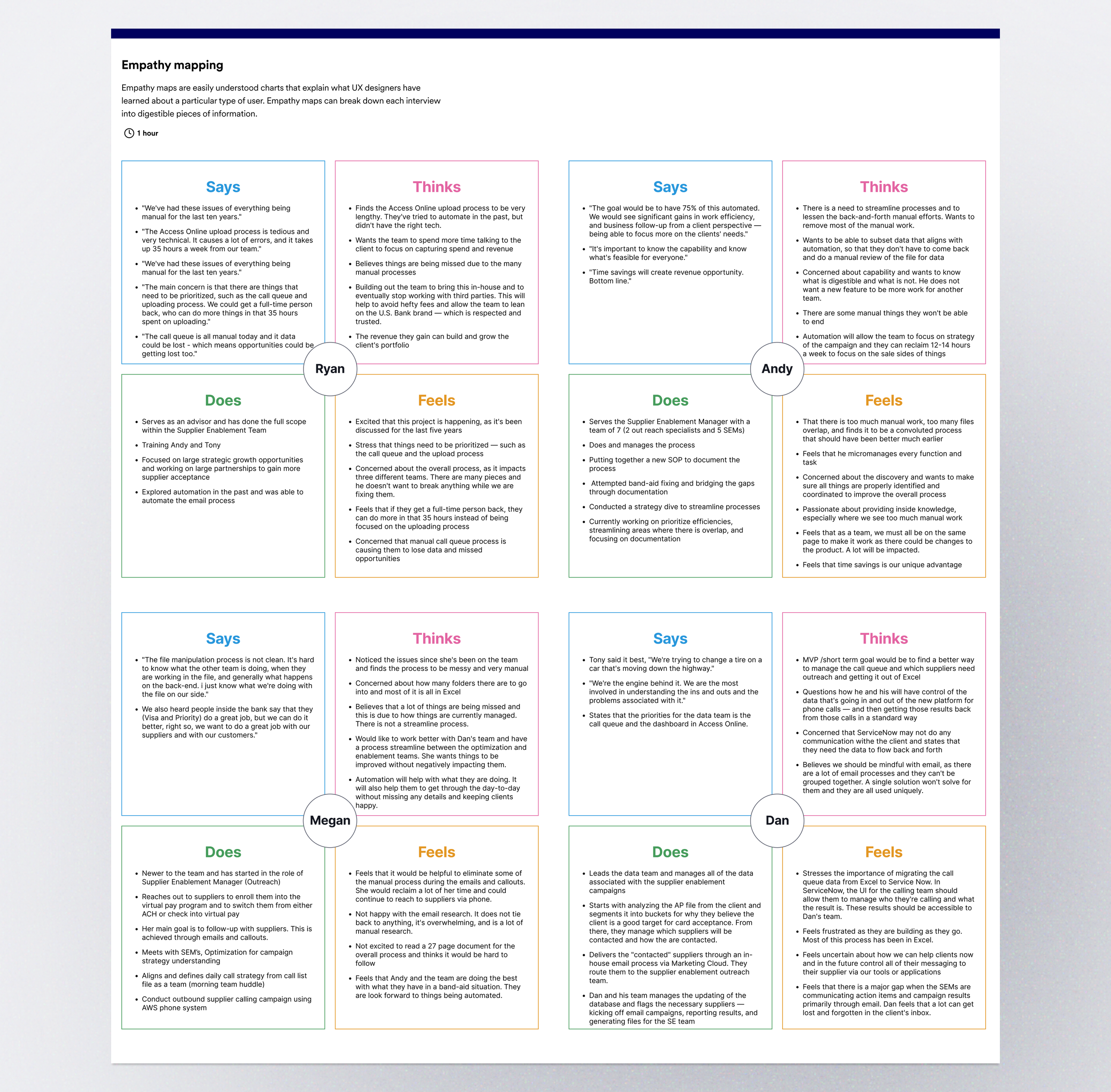
Empathy-mapping exercise synthesizing partner interview findings into what users say, think, do, feel, and need from the future experience.
Across the interviews, four insights began to shape the product direction:
01 - Manual work was consuming valuable time
The Access Online upload process alone was estimated to take approximately 35 hours of team capacity each week.
02 - Information was fragmented across tools
Campaign work depended heavily on spreadsheets, email, call lists, trackers, and other disconnected processes, creating opportunities for information and follow-up to be missed.
03 - Automation could create capacity for higher-value work
Partners wanted less time spent manipulating files and more time available for campaign strategy, supplier outreach, and client support
04 - Partners wanted less time spent manipulating files and more time available for campaign strategy, supplier outreach, and client support
Teams needed clearer insight into campaign progress, supplier responses, team activity, and outstanding actions rather than simply replacing one manual process with another.
Turning insights into a shared design direction
With the research in front of us, we reframed recurring pain points as “How Might We” questions. The team grouped related opportunities around automation, call management, reporting, data, communication, and campaign performance, then voted to identify the areas with the greatest potential impact.
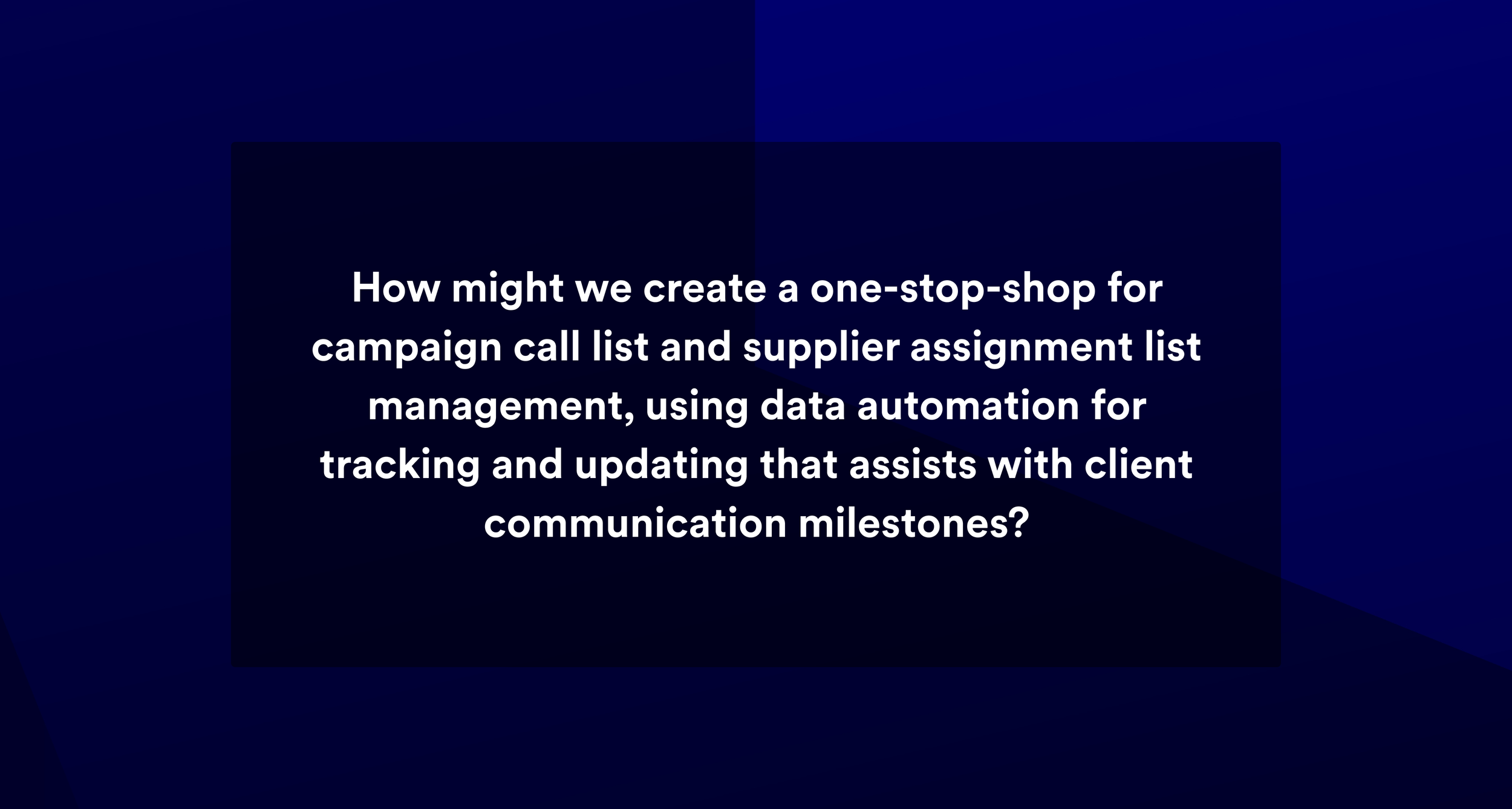
This gave the team a shared problem to design around: not simply digitizing an existing process, but creating a connected workspace that could reduce manual coordination while making campaign activity easier to understand and manage.
Improve campaign visibility
Support active outreach
Synthesis: turning research into product priorities
Our research revealed that the challenge extended beyond simplifying individual tasks. The Supplier Enablement team needed greater visibility across campaigns, clearer ways to organize daily work, and less dependence on spreadsheets. We synthesized these findings into a primary persona, the Calling Captain, to help the team align around the needs that would guide the experience.
Defining the primary user
The Calling Captain needed to coordinate outreach while maintaining visibility into campaign and team performance. Manual data entry, disconnected processes, and the volume of suppliers made it difficult to focus on higher-value work. The experience needed to help them quickly understand what required attention and take action without relying on multiple spreadsheets.
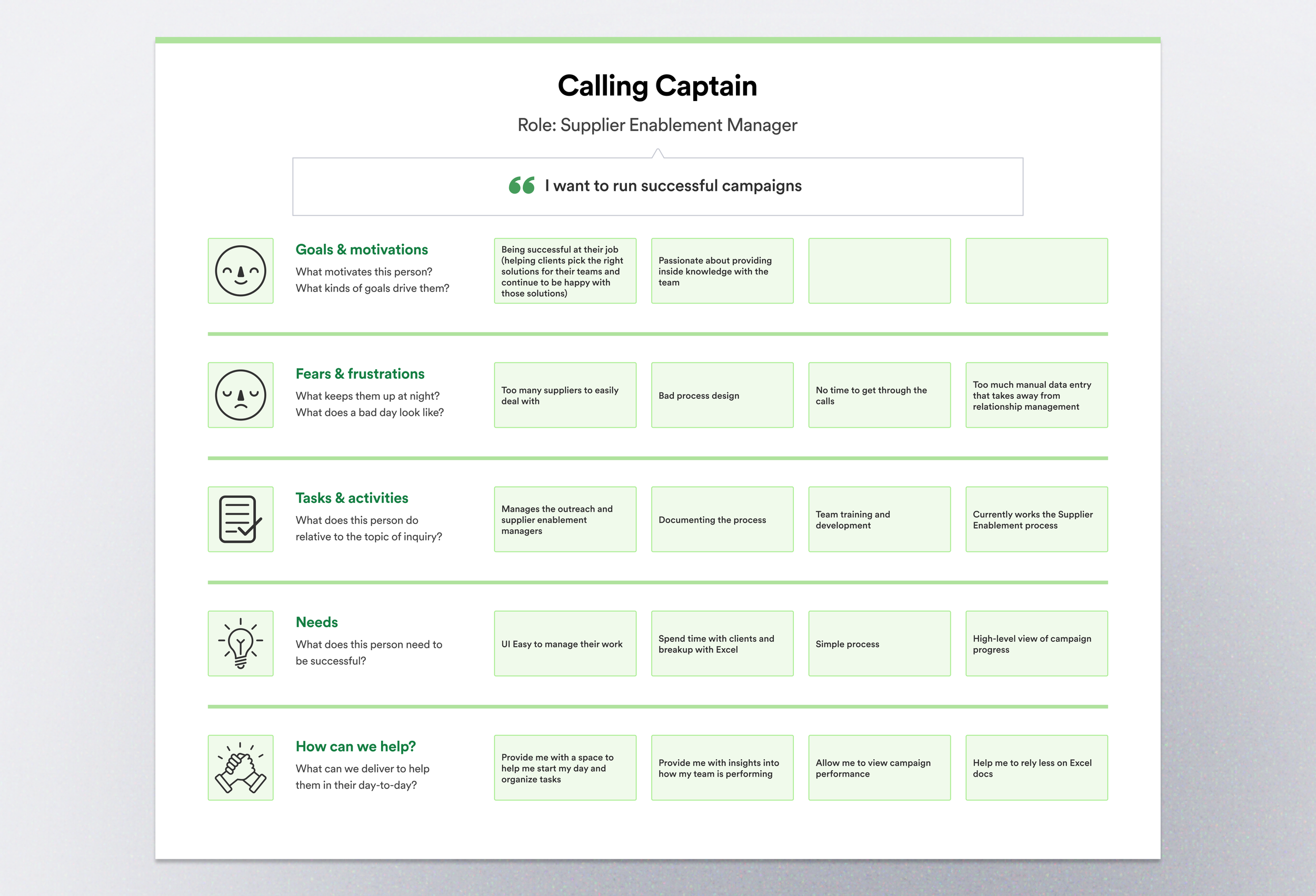
Research findings were synthesized into a primary user representing the managers responsible for coordinating supplier outreach, monitoring campaign activity, and supporting the calling team.
Translating user needs into experience priorities
The persona helped us translate research findings into four experience priorities that could guide our design decisions and keep the team focused on the Calling Captain's most important needs.
01
Organize daily work
Create a centralized starting point for tasks and campaign activity.
02
Understand team performance
Surface calling activity and team progress.
03
Monitor campaign performance
Provide high-level visibility into campaign status and outcomes.
04
Rely less on Excel
Bring critical workflows and information into a connected experience.
These priorities gave us a framework for evaluating ideas and helped shift the conversation from designing around available data to designing around the work users needed to accomplish.
Exploration: shaping the experience
With the primary user and experience priorities defined, I began translating research into workflows and interface concepts. Working within rapid two-day sprints, I explored how the Calling Captain could manage campaigns, monitor activity, and take action within a more connected ServiceNow experience.
Mapping the work before designing the interface
Before defining the interface, I mapped key task flows to understand how the Calling Captain would complete campaign activities and what information and actions were needed along the way. This helped me think beyond individual screens and consider how each step could work together as a connected experience.
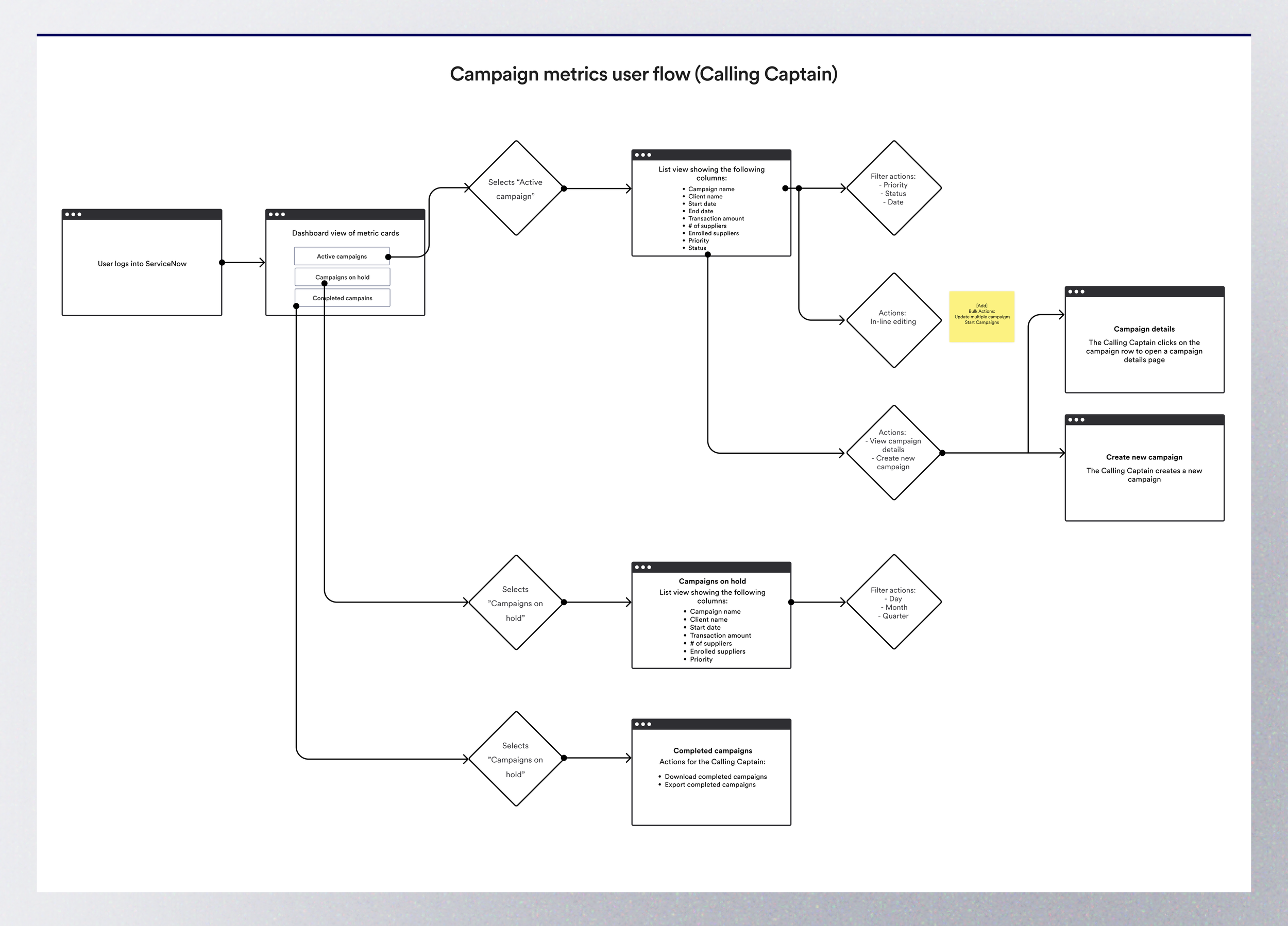
Research findings were synthesized into a primary user representing the managers responsible for coordinating supplier outreach, monitoring campaign activity, and supporting the calling team.
Exploring the experience together
With the core workflows mapped, I moved into rapid concept exploration by creating low-fidelity napkin sketches of the primary workspace. I shared these early concepts with the team and Supplier Enablement partners to gather feedback on workflow, information hierarchy, and missing functionality before moving into higher-fidelity design.
Early concepts were shared with Supplier Enablement partners to gather feedback before investing in higher-fidelity design. Keeping the concepts intentionally lightweight made it easier to discuss workflow, hierarchy, and missing information while ideas were still inexpensive to change.
Designing within the ServiceNow ecosystem
Because the experience would live within ServiceNow Workspace, I needed to understand the platform's existing patterns, components, and technical constraints. I used those constraints to refine the concepts while keeping the team's needs, technical feasibility, and platform consistency in balance.
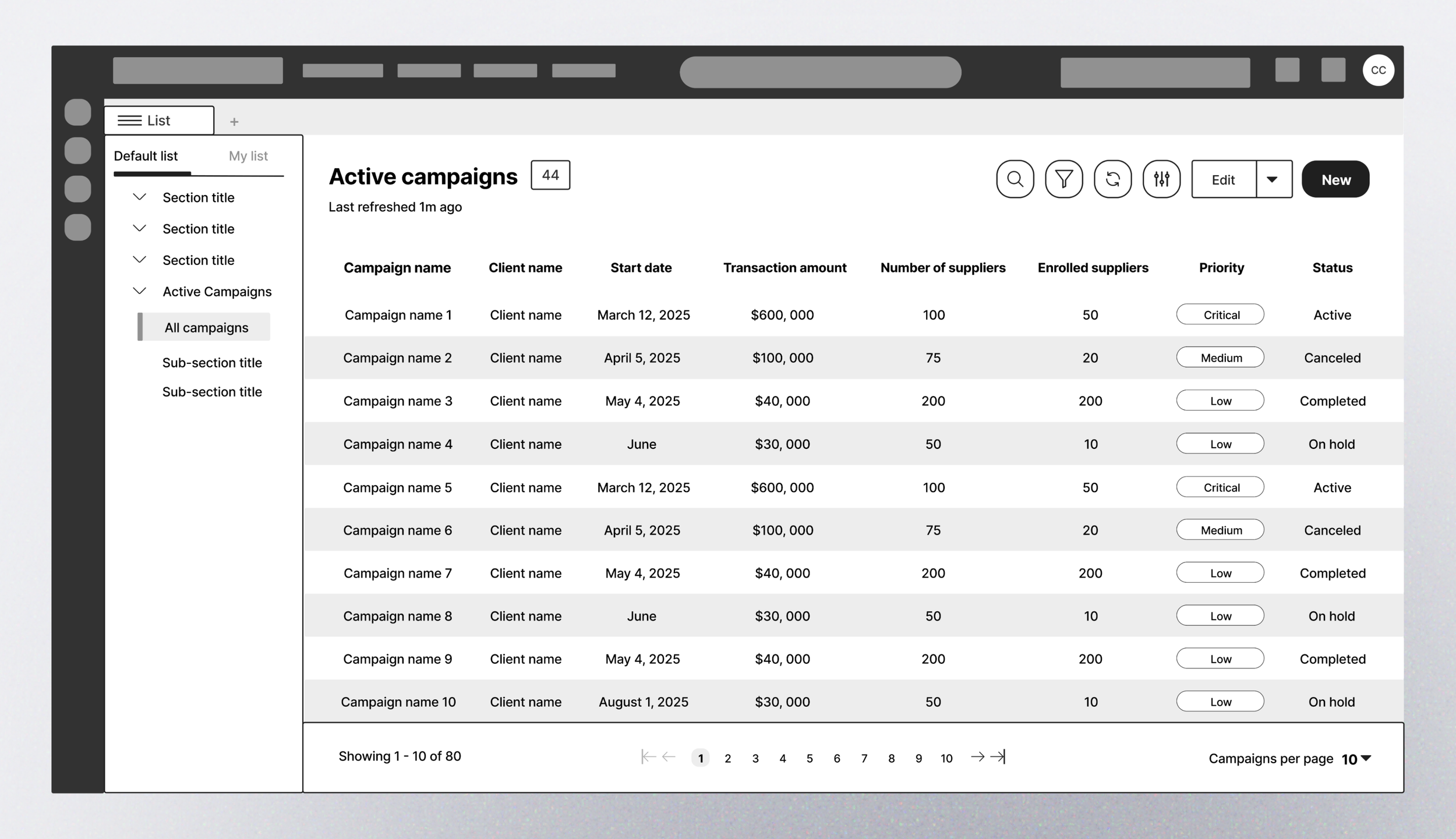
Campaign list exploration: An early concept for organizing campaign information and providing the Calling Captain with a clearer view of active work and campaign status.
I explored how the Calling Captain's needs could translate into ServiceNow Workspace patterns, using available components and interaction behaviors to organize campaign information, surface key actions, and create clearer paths through the workflow.
These explorations helped establish the core workflows and interaction patterns for the experience, creating a foundation for defining what the first version of the product needed to deliver.
MVP: focusing the first release
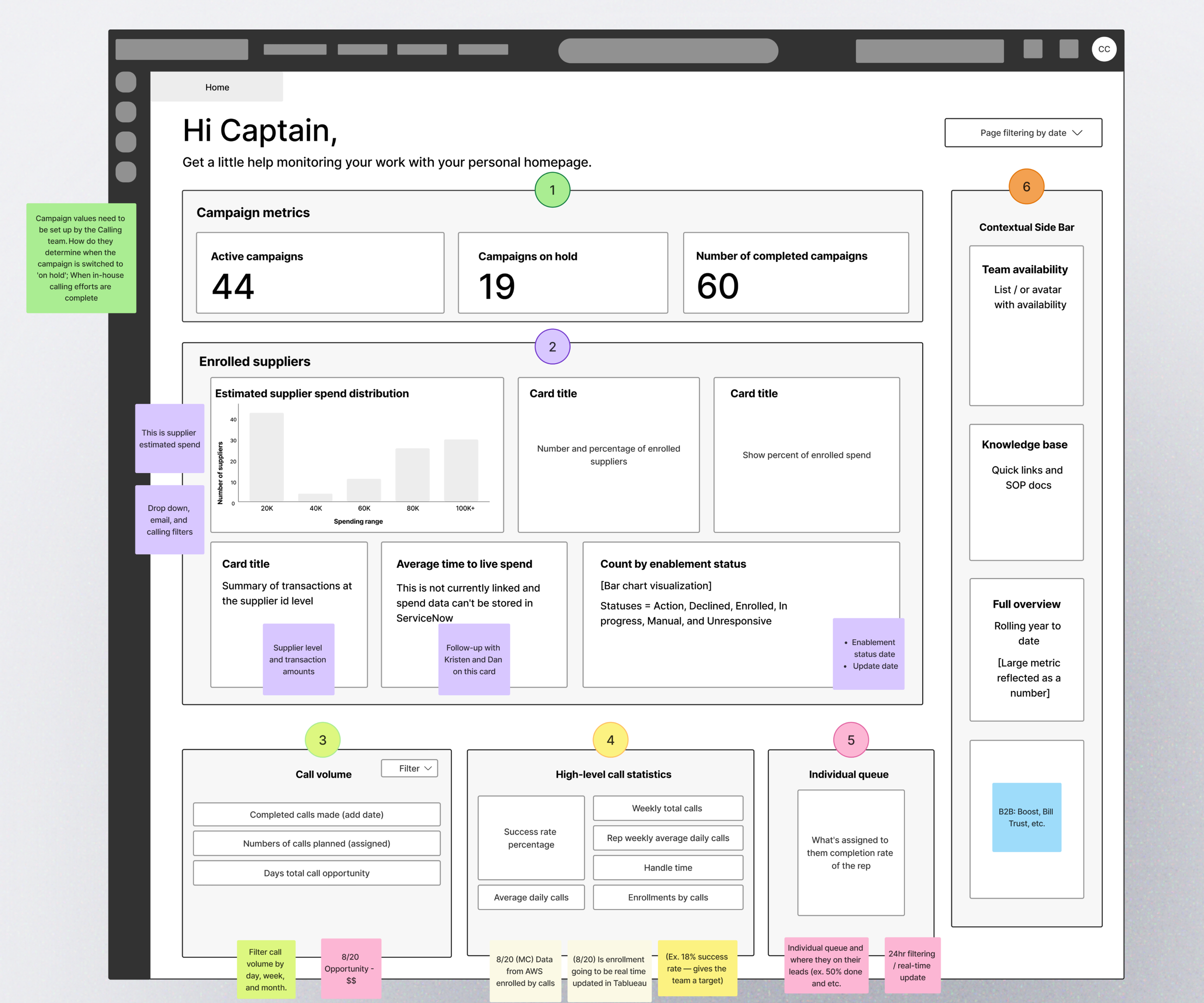
The research and early exploration revealed opportunities across the broader supplier enablement workflow, but the first release needed a focused starting point. I translated the experience priorities and early concepts into an MVP dashboard centered on the information the Calling Captain needed to monitor campaign activity, understand team progress, and identify where attention was needed.
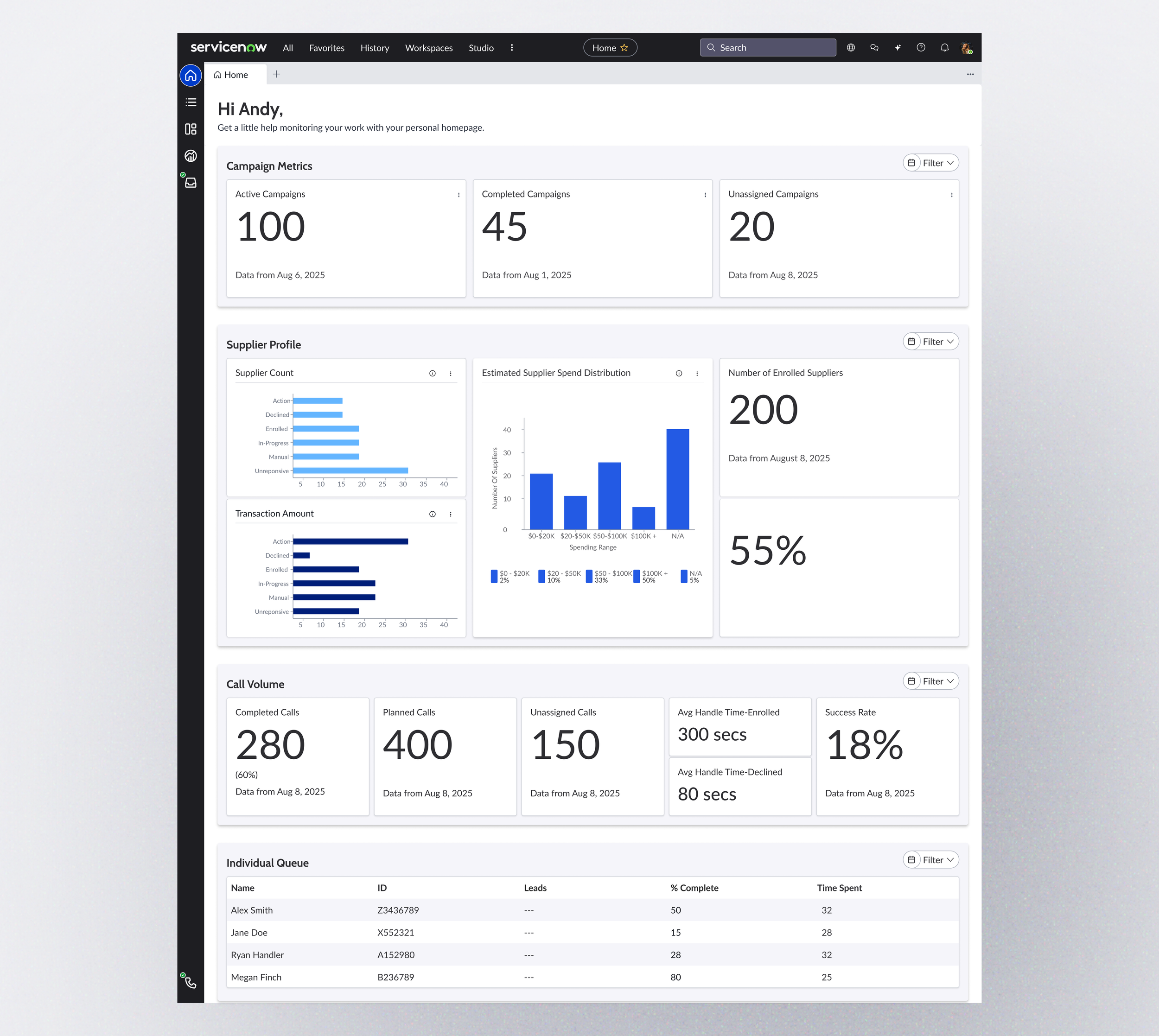
MVP dashboard concept designed to give the Calling Captain a centralized view of campaign performance, supplier activity, call volume, and team workload.
Campaign visibility
Surface active, completed, and unassigned campaigns to give the Calling Captain an immediate view of campaign status.
Supplier insights
Bring supplier status, enrollment, transaction, and spend information into the same workspace to reduce the need to piece together information across tools.
Individual workload
Provide visibility into individual queues and progress to help the Calling Captain understand how work is distributed across the team.
Calling performance
Make planned, completed, and unassigned calls visible alongside success and handling metrics so campaign progress can be monitored more easily.
The MVP brought previously fragmented campaign, supplier, and calling information into a single workspace, giving the Calling Captain a clearer view of campaign health and team activity while creating a foundation for further workflow automation.